Thursday, January 24, 2019

Mapping the Overlap of SERP Feature Suggestions

Posted by TheMozTeam

From carousel snippets to related searches to “People also ask” boxes and “People also search for” boxes, the Google SERP is jam-packed with features that not only aid in keyword list creation but can help you better understand the topics your unique search landscape is structured around.

In fact, the increase of topics and entities as a way of navigating and indexing the web was one of the biggest developments in search in 2018. This is why we took 40,977 SERPS and stripped out every term or phrase from the aforementioned features — a small, first step toward making sense of Google’s organizational skills.

We wanted to see how much overlap might exist across these different SERP features. Does Google give us a lot of new keywords to work with or just suggest the same stuff over and over again? Do we need to pay attention to each SERP feature when building out our SEO strategy or can we overlook a few? We dug into a bunch of data in STAT to find out.

A little bit on topics and entities and SERP features

In September 2018, Google announced a new layer to its knowledge graph:

“The Topic Layer is built by analyzing all the content that exists on the web for a given topic and develops hundreds and thousands of subtopics. For these subtopics, we can identify the most relevant articles and videos—the ones that have shown themselves to be evergreen and continually useful, as well as fresh content on the topic. We then look at patterns to understand how these subtopics relate to each other, so we can more intelligently surface the type of content you might want to explore next.”

But, even before Google came out with its Topic Layer, Cindy Krum, CEO & Founder of MobileMoxie, was all about what she called “entities” as mobile-first indexing was (finally) rolling out. See if you can spot the similarities:

“Entities can be described by keywords, but can also be described by pictures, sounds, smells, feelings and concepts; (Think about the sound of a train station – it brings up a somewhat universal concept for anyone who might hear it, without needing a keyword.) A unified index that is based on entity concepts, eliminates the need for Google to sort through the immense morass of changing languages and keywords in all the languages in the world; instead, they can align their index based on these unifying concepts (entities), and then stem out from there in different languages as necessary.”

Bringing it back to SEO-specifics, Cindy explains that both domains (traditionally associated with indexing) and the brands that operate them can be considered entities. “Indexing based on entities is what will allow Google to group all of a brand’s international websites as one entity, and switch in the appropriate one for the searcher, based on their individual country and language.”

So, what does any of this have to do with our SERP features of choice? Well, all of the suggested terms packed into them are the direct result of Google’s endless topic analysing and organizing. We might not be privy to every entity Google scrapes but we can certainly take cues from how they choose to express the final product on the SERP.

How we made the magic happen

In order to map the overlap in our particular query space, we took the highly scientific word-bag approach. Operating on a SERP-by-SERP level of analysis, we scooped each feature’s suggestions into its own bag, filtered out any stop words, and then compared one bag’s suggestions to another, looking for a match and tallying as we went.

So, for example, we’d examine all the PAA questions on one SERP against all the related searches on the same SERP. Each PAA suggestion got its own bag, as did each related search, and we removed the search term itself from all of the bags. If any remaining words in the two bags matched, we counted it as an overlap, divided it by the total number of possible overlaps, and got the total entity overlap between these features. Phew!

In the end, after combing through 40,977 SERPs, we made roughly forty-million word bag comparisons. No sweat.

What we found

Ultimately, there’s not a lot of overlap happening with our four features. A measly average of 4 percent of the search suggestions saw any duplication in terms. This tells us that Google’s putting a lot of care and consideration into what each SERP feature’s up to and we’d be wise to keep an eye on all of them, even it means weeding out a few duplicate suggestions now and then.

Here’s how things turned out when we looked at specific pairings:

Carousel snippets

Carousel snippets hold the answers to many different questions thanks to the “IQ-bubbles” that run along the bottom of them. When you click a bubble, JavaScript takes over and replaces the initial “parent” snippet with one that answers a brand new query. This query is a combination of your original search term and the text in the IQ-bubble. For this bit of research, we took the bubble text and left the rest.

It turns out that carousel snippet IQ-bubbles had the least amount of overlap with the other three SERP features. This is likely because the bubbles, while topically related to the original query, typically contain subcategories that live within the high-level category introduced by the search term.

Take the above snippet for example. The query [savings account rates] produces a SERP with organic results and other features that provide general info on the subject of savings accounts. The bubbles, however, name different banks that have savings accounts, making them highly distinct keyword suggestions.

Other reasons to consider these terms when list-building and content strategizing: Google keeps this snippet right at the top of the SERP and doesn’t require clicking of any kind in order to surface the bubbles, which means they’re one of the first things Google makes sure a searcher sees.

The "People also ask" box

The “People also ask” box typically contains four questions (before it gets infinite) related to the searcher’s initial query, which then expand to reveal answers that Google has pulled from other websites and links that guide users to a SERP of the PAA question.

Not only are PAA questions excellent long-tail additions to your keyword set, they’re also a great resource for content inspiration. So we stripped them out and dumped them into our word bags to analyse.

PAA questions ended up returning the second highest level of duplication, though most of that was tied to terms we pulled from the “People also search for” box — the two had a 10.41 percent overlap.

This makes sense as both ostensibly offer up other terms that people either ask or search for. It could also be a result of the longer length of both suggestions, which can create more opportunity for matching.

Related searches

No less than eight related searches sit at the very bottom of each SERP and, when clicked, become the search query of a new SERP. These help to refine or expand on the original query.

We were surprised to see how little duplication related searches had with the other SERP features — they were oddly unique. We say “oddly unique” because these terms are usually shorter and more iterative of the original query, tending to stay on topic and, as a result, we expected them to show up more in the other features (the carousel snippet perhaps being the only exception).

The "People also search for" box

In order to surface a “People also search for” box, you need to do a little pogo-sticking. It’ll materialize after clicking an organic search result and then navigating back to the SERP. Mobile PASFs typically have eight topically-related terms that open up a new SERP, while desktop PASFs usually have six.

Out of all our comparisons, PASF boxes had the most amount of overlap, particularly with PAAs (which we noted above) and related searches. Given that PASF terms are attached, both physically and topically, to the organic result and not the search query, we actually didn’t expect them to share this much.

One possible explanation would be the sheer volume of them. With an average of 8.77 boxes per SERP and six or eight terms per box, this would lead to both a lot of duplication within the box itself and an overall saturation of the topic field. But, when we think about what PAAs and related searches attempt to do, PASFs do seem like a mix of both.

Putting it all together

With not a lot of term overlap happening, it’s a good idea to keep all of these features top of mind. Google may be running out of unique-sounding names for them, but they’re not running out of unique suggestions to stuff into them.

Even if understanding the topic hierarchies that rule your query space is a little outside of your day-to-day concerns, if people click on search suggestions rather than — or even in addition to — organic results, then it stands to reason that you should at least be trying to rank for these terms as well as the base query.

If you’re super pressed for time or don’t have the resources required to wade through each SERP feature’s suggestions and had to pick just one, you could run with the PASF box (though we’d still recommend you throw in any IQ-bubbles that show up) as it returns the highest duplication.

Conversely, since STAT’s got super easy PAA and related searches reports, you could quickly cover about as much ground with those two. Want take those reports (and more) for a test drive? Say hello and request a demo!

This post was originally published on the STAT blog.


Sign up for The Moz Top 10, a semimonthly mailer updating you on the top ten hottest pieces of SEO news, tips, and rad links uncovered by the Moz team. Think of it as your exclusive digest of stuff you don't have time to hunt down but want to read!

http://bit.ly/2CFFoGF

7 Trends in Hiring Talent for Your Content Marketing Team in 2019

7 Trends in Hiring Talent for Your Content Marketing Team in 2019

Are you ready to build and develop your content operations team in 2019? Kapost just released its Content Operations and Strategy Hiring Handbook, which offers statistics about what B2B companies look for when hiring content operations talent and tips for building out your team. 

For the report, Kapost surveyed 506 U.S. marketers and filtered responses to include only B2B-focused companies with dedicated content teams or employees. 

Here are eight major trends covered in the report that you need to be aware as you head into the new year.

1. Most Companies Are Hiring Specifically for Content Teams

Kapost notes that five years ago, very few organizations hired specifically for content operations. They cite a 2013 report from Altimeter that found very few of the companies had content divisions or staff with the word “content” in their titles.

Today, things look much different — 67 percent of respondents told Kapost that their organizations would hire specifically for content teams in the coming year. Three out of four organizations interviewed have dedicated content teams, and most also have content operations roles to manage the strategy and process behind their content. This demonstrates that company leadership increasingly views content as a legitimate aspect of business strategy that deserved a dedicated team.

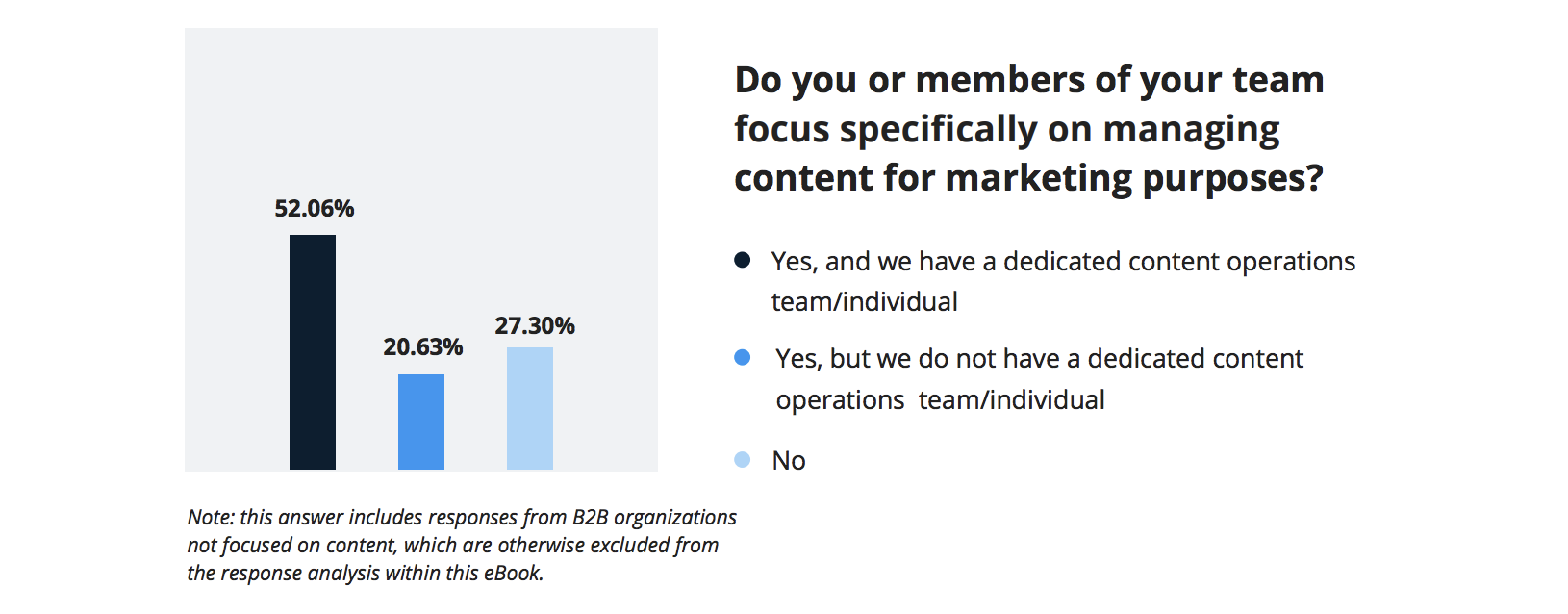
Even including the organizations that don’t focus on content, more than half have dedicated content teams. Just over 20 percent focus on managing content for marketing but don’t have dedicated content teams or employees, while 27.3 percent don’t focus on marketing content at all.

Content Talent Statistic 1

2. Content Budgets Are Increasing

Another sign of increased executive buy-in for content operations is the trend toward higher content budgets. Today’s content teams now have more resources available to them, and most content budgets are expected to increase in 2019.

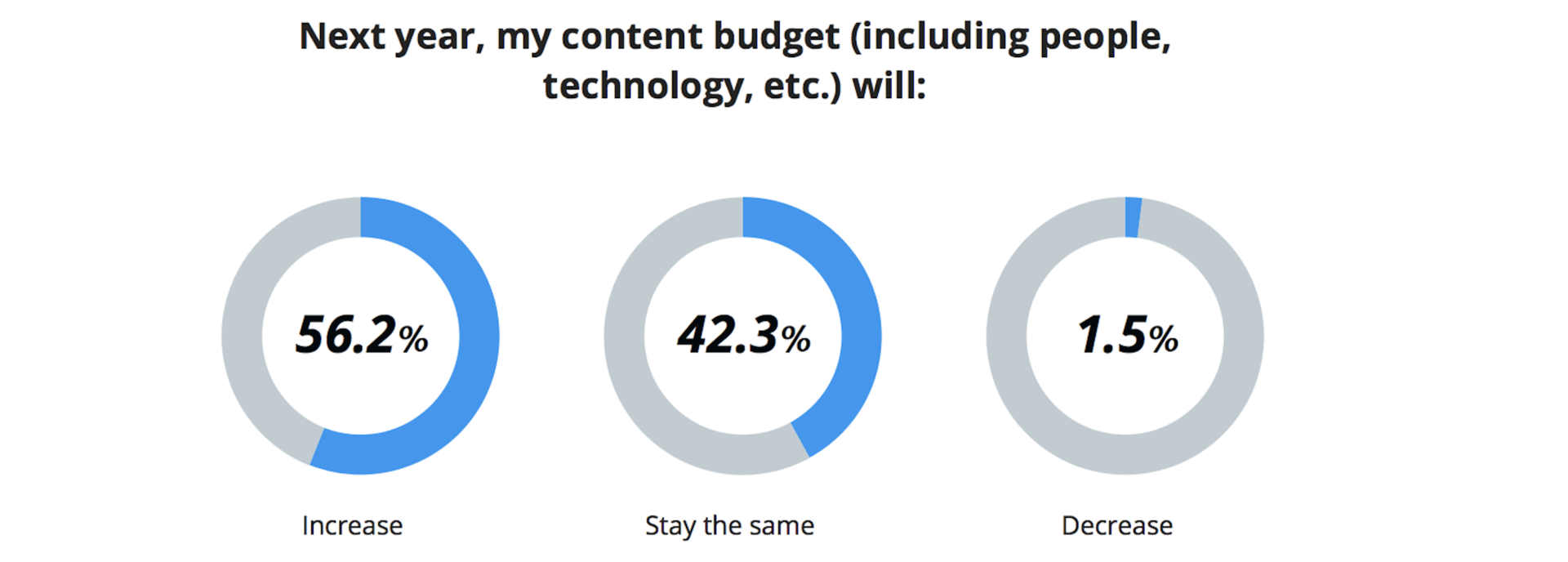
Of the companies included in Kapost’s survey, 56.2 percent said their content budgets would increase in the next year, 42.3 percent said it would remain the same and just 1.5 percent said it would decline. Overall, that means 98.5 percent of content budgets will be either increasing or staying the same this year. This demonstrates an overwhelming consensus that content is valued in today’s organizations and worth investing in.

Content Team Budget Statistic 2019

If your content budget is one that isn’t increasing, you may be interested in the advice Kapost offers in the report for increasing buy-in. They recommend focusing on current missed opportunities rather than requesting increased funding and provide formulas to help you justify a budget increase.

3. Customer Experience Reigns Supreme for Content Marketing TEams

In 2019, content will continue to play an essential role in customer experience — 97 percent of marketers told Kapost they believe this year content will be as important or more important as last year for creating positive customer experiences. Good customer experience is, of course, crucial for business success. Because of this, delivering the best customer experience possible should be the top goal of content operations teams in 2019.

Customer Experience Content Statistic

4. Content Marketing Teams Are Increasingly Responsible for Strategy and Operations

In the early days of content marketing, the content team was responsible mainly for creating the content, mostly in the form of writing and editing. Increasingly, the content team is also in charge of the strategy and operations behind the content. This aspect of the job has become more important in recent years and will continue to play a more central role this year.

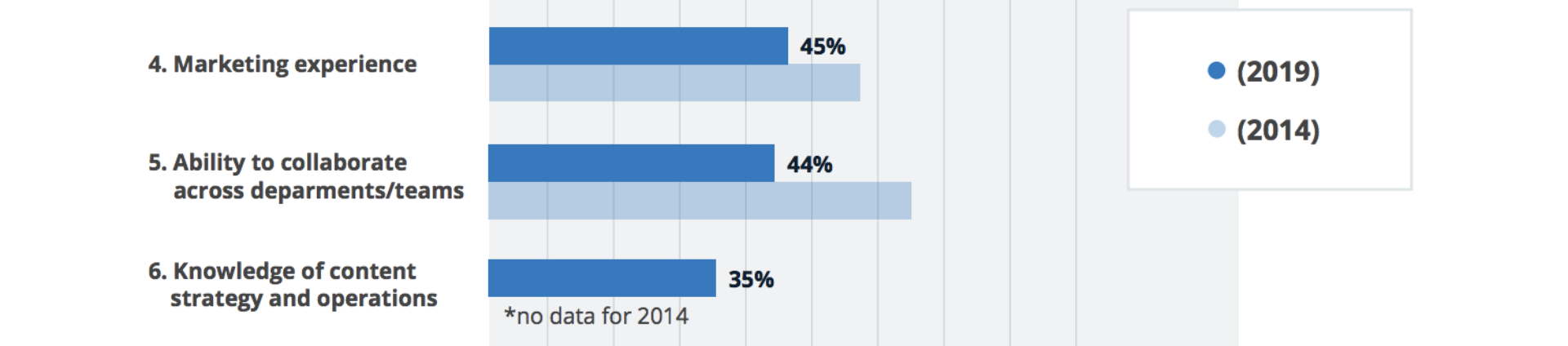
About 35 percent of hiring managers interviewed said they look for knowledge of strategy and operations when hiring for their content teams. Kapost didn’t have data on this for 2014 as it did for the other qualities it asked hiring managers. Kapost also found that many hiring managers look for employees who can effectively collaborate across departments. This shows just how much content marketing has matured over the years. It now requires a more well-rounded set of skills and strategic thinking abilities.

Content Team Strategy Statistic 20195. Content Teams Increasingly Work With Multimedia

The skills that content teams possess have also changed in another major way. Content operations has moved away from its heavy focus on writing to also include other forms of media, including video, graphic design and web design. The skills hiring managers look for have shifted accordingly.

In 2014, more than 90 percent of hiring managers said writing and editing was one of the main qualities they looked for in candidates. For 2019, that number is 57 percent. Conservely, just over 10 percent of hiring managers cited video production skills in 2014, while 30 percent did in 2019. The percentage of hiring managers looking for graphic and web design skills jumped from around 25 percent to 47 percent over the same period.

Qualities Content Marketers

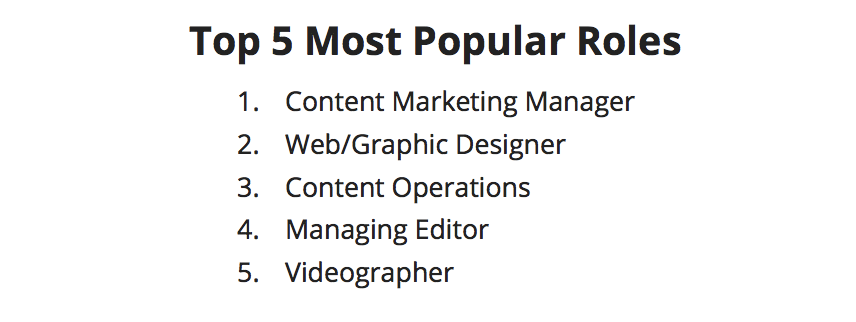
Among the top most popular roles on content teams, Web/Graphic Designer was number two, while Videographer was number five. Managing Editor came in at number four.

6. Marketing/Advertising Is Now the Most Desired Major for Content Marketing Talent

As the skills hiring managers look for changed over the years, so did the educational backgrounds they preferred their candidates to have. 

In 2014, most hiring managers looked for three to five years of content marketing experience, rather than a specific major. That took the number one spot on the list of most-wanted educational backgrounds, while English/Journalism took second and Marketing/Advertising took third. 

In 2018, Marketing/Advertising was the most popular major, followed by Graphic/Web Design followed by content marketing experience rather than a major.

Content Marketing Experience

7. Content Marketing Manager Is the Most Popular Position

According to Kapost’s survey, Content Manager was the most popular role for content teams. That was followed by Web/Graphic Designer, Content Operations, Managing Editor and Videographer.

Kapost noted that the content operations now spans every touchpoint with customers, leads and prospects — not just the top of the funnel. You can find content operations across teams such as marketing operations, content marketing, product marketing and design. They also listed some of the most critical content team members, along with how each of them contributes to the content operations, their daily responsibilities and their key characteristics. 

The positions Kapost listed included Head of Content Operations, Content Strategist, Product Messaging Strategist, Customer Advocacy Strategist, Marketing Technologist, Web Designer and Developer, Visual Designer and Videographer.

Content Team RolesContent operations is continually changing, and hiring managers need to be aware of the latest trends to ensure they can build a team that will succeed in today’s environment. For more details and tips for hiring content marketing talent in 2019, you can download Kapost’s full report here.

The post 7 Trends in Hiring Talent for Your Content Marketing Team in 2019 appeared first on Convince and Convert: Social Media Consulting and Content Marketing Consulting.

http://bit.ly/2sSd1AN

Seven Helpful Social Media Writing Tips For Businesses

Seven Helpful Social Media Writing Tips For Businesses

Social media is still considered by many to be the useless pastime of young people with nothing better to do with their lives. The reality is that social media can be considered to be one of the most massive advertising platforms in existence. Billions of people of all ages and walks of life use social media to keep up with friends, family, organizations, and their interests. The fact of the matter is, a savvy business can reach more people through social media than it ever could through traditional means of billboards, newspaper advertisements or even television commercials.

That being the case, any modern business should invest in public outreach on social media. Unfortunately, public outreach in the form of organic social media is becoming more and more difficult to do due to declining reach in the social network algorithms. That’s why Paid Social, or social media advertising, is mainstream today.

http://bit.ly/2CEXVD3

How to Develop a Social Video Strategy: Tips and Tools

Need to add more video to your marketing? Wondering how to use video strategically? In this article, you’ll discover tips and easy-to-use tools that will help you incorporate video into your marketing campaigns. #1: Align Video Content With Your Social Media Marketing Objectives Any content you create for your social media channels should ideally serve

The post How to Develop a Social Video Strategy: Tips and Tools appeared first on Social Media Marketing | Social Media Examiner.

http://bit.ly/2Tf0kvq

Goodbye Pinterest: The Journey, Season 2, Episode 18

Is your website traffic converting? Then watch The Journey, Social Media Examiner’s episodic video documentary that shows you what really happens inside a growing business. Watch the Journey This episode of the Journey explores how Social Media Examiner made the decision to fully abandon Pinterest, despite receiving lots of traffic from the platform. Watch how they

The post Goodbye Pinterest: The Journey, Season 2, Episode 18 appeared first on Social Media Marketing | Social Media Examiner.

http://bit.ly/2AXNiLy

Wednesday, January 23, 2019

Uncovering SEO Opportunities via Log Files

Posted by RobinRozhon

I use web crawlers on a daily basis. While they are very useful, they only imitate search engine crawlers’ behavior, which means you aren’t always getting the full picture.

The only tool that can give you a real overview of how search engines crawl your site are log files. Despite this, many people are still obsessed with crawl budget — the number of URLs Googlebot can and wants to crawl.

Log file analysis may discover URLs on your site that you had no idea about but that search engines are crawling anyway — a major waste of Google server resources (Google Webmaster Blog):

“Wasting server resources on pages like these will drain crawl activity from pages that do actually have value, which may cause a significant delay in discovering great content on a site.”

While it’s a fascinating topic, the fact is that most sites don’t need to worry that much about crawl budget —an observation shared by John Mueller (Webmaster Trends Analyst at Google) quite a few times already.

There’s still a huge value in analyzing logs produced from those crawls, though. It will show what pages Google is crawling and if anything needs to be fixed.

When you know exactly what your log files are telling you, you’ll gain valuable insights about how Google crawls and views your site, which means you can optimize for this data to increase traffic. And the bigger the site, the greater the impact fixing these issues will have.

What are server logs?

A log file is a recording of everything that goes in and out of a server. Think of it as a ledger of requests made by crawlers and real users. You can see exactly what resources Google is crawling on your site.

You can also see what errors need your attention. For instance, one of the issues we uncovered with our analysis was that our CMS created two URLs for each page and Google discovered both. This led to duplicate content issues because two URLs with the same content was competing against each other.

Analyzing logs is not rocket science — the logic is the same as when working with tables in Excel or Google Sheets. The hardest part is getting access to them — exporting and filtering that data.

Looking at a log file for the first time may also feel somewhat daunting because when you open one, you see something like this:

Calm down and take a closer look at a single line:

66.249.65.107 - - [08/Dec/2017:04:54:20 -0400] "GET /contact/ HTTP/1.1" 200 11179 "-" "Mozilla/5.0 (compatible; Googlebot/2.1; +http://www.google.com/bot.html)"

You’ll quickly recognize that:

  • 66.249.65.107 is the IP address (who)
  • [08/Dec/2017:04:54:20 -0400] is the Timestamp (when)
  • GET is the Method
  • /contact/ is the Requested URL (what)
  • 200 is the Status Code (result)
  • 11179 is the Bytes Transferred (size)
  • “-” is the Referrer URL (source) — it’s empty because this request was made by a crawler
  • Mozilla/5.0 (compatible; Googlebot/2.1; +http://bit.ly/eSXNch) is the User Agent (signature) — this is user agent of Googlebot (Desktop)

Once you know what each line is composed of, it’s not so scary. It’s just a lot of information. But that’s where the next step comes in handy.

Tools you can use

There are many tools you can choose from that will help you analyze your log files. I won’t give you a full run-down of available ones, but it’s important to know the difference between static and real-time tools.

  • Static — This only analyzes a static file. You can’t extend the time frame. Want to analyze another period? You need to request a new log file. My favourite tool for analyzing static log files is Power BI.
  • Real-time — Gives you direct access to logs. I really like open source ELK Stack (Elasticsearch, Logstash, and Kibana). It takes a moderate effort to implement it but once the stack is ready, it allows me changing the time frame based on my needs without needing to contact our developers.
Start analyzing

Don’t just dive into logs with a hope to find something — start asking questions. If you don’t formulate your questions at the beginning, you will end up in a rabbit hole with no direction and no real insights.

Here are a few samples of questions I use at the start of my analysis:

  • Which search engines crawl my website?
  • Which URLs are crawled most often?
  • Which content types are crawled most often?
  • Which status codes are returned?

If you see that Google is crawling non-existing pages (404), you can start asking which of those requested URLs return 404 status code.

Order the list by the number of requests, evaluate the ones with the highest number to find the pages with the highest priority (the more requests, the higher priority), and consider whether to redirect that URL or do any other action.

http://bit.ly/2AXmwTG

Word of Mouth Marketing Defined {Proactive and Reactive Versions}

Word of Mouth Marketing Defined

According to the Business Dictionary, Word of Mouth Marketing is:

Oral or written recommendation by a satisfied customer to the prospective customers of a good or service. Considered to be the most effective form of promotion, it is also called word of mouth advertising which is incorrect because, by definition, advertising is a paid and non-personal communication.

We define Word of Mouth Marketing a little differently here at Convince & Convert:

Turning your customers into your most effective sales and marketing asset by doing something they don’t expect, thus giving them a story to tell.

But as a practical matter, that’s not quite nuanced enough either. Because even when you succeed in getting your customers to talk about your business, there are still two different types of word of mouth: reactive word of mouth, and proactive word of mouth.

To achieve either, you need to first understand that competency doesn’t create conversation. When you do exactly what your customers expect and anticipate you will do, they do not mention that to anyone because there is no STORY there.

I have never said — to anyone — “Hey, let me tell you about this perfectly adequate experience I had recently.” That would be a terrible story. Not interesting to tell, and not interesting to hear. Word of mouth requires story crafting. If we can help you create and propagate the story of your company, let us know.

Competency doesn't create conversation. #WordOfMouth
Click To Tweet

Once you have a story catalyst (we call them Talk Triggers), you will prompt one or both of the two types of word of mouth.

To demonstrate the difference between reactive word of mouth and proactive word of mouth, let’s use one of our favorite examples, the chocolate chip cookie at DoubleTree Hotels. Every day, for nearly 30 years, DoubleTree has given each guest a warm, chocolate chip cookie at check-in.

Those cookies are LEGIT. And people tell stories about those cookies constantly. How often? Our research found that 34% of DoubleTree’s guest have told a story about the cookie. That means that given that they give out 75,000 cookies each day, the story is told approximately 22,500 times every 24 hours. That’s a LOT of word of mouth.

And that’s why you don’t see much advertising from DoubleTree. The cookie is the ad, and the guests are the media.

34% of @DoubleTree's guest have told a story about their warm chocolate chip cookies. #WordOfMouth #TalkTriggers
Click To Tweet
Reactive Word of Mouth Definition

When your customer mentions your product or service when prompted, in the midst of an offline conversation, an online exchange, or similar.

For example, if I was with some friends at dinner and someone asked, “We’re going on a trip to Houston, any idea where we should stay?” I might chime in with “Yes! The DoubleTree at the Galleria is terrific, and the chocolate chip cookies at the front desk are the best.”

I am reacting to the situation and am making a recommendation in that context. “Referrals” is what reactive word of mouth is called in some instances.

Proactive Word of Mouth Definition

When your customer introduces or inserts your product or service into a topically unrelated offline conversation, online exchange, or similar.

For example, if I was at the same dinner, with the same people and someone asked, “Anyone do anything interesting lately?” I might answer “Yes! I was in Houston last week. I stayed at the DoubleTree, and you would not believe the amazing chocolate chip cookies they hand out at the front desk.”

In this scenario, I am not waiting for the topic to come around to hotels before mentioning DoubleTree and their famous cookies. Instead, I am inserting the cookies into a broader conversation and turning the topic toward DoubleTree.

Which Type of Word of Mouth is Best?

Both are important. In fact, word of mouth is the most persuasive and most common way that people make buying decisions.

However, proactive word of mouth is the superior type because it requires your customer to be so enthralled with your product or service that they are compelled to find a way to bring it up in conversation, even if it’s not on topic, per se.

Telling a story when asked is one thing. Telling a story without being asked is something else entirely. It requires more conviction and more passion.

To make sure the word of mouth about you is proactive as much as possible, you need to make certain that your Talk Trigger is truly differentiated. You have to do something different, that your customers do not expect, and then find irresistible.

The book that Daniel Lemin and I wrote about this topic includes dozens of case studies that might inspire you to find your own differentiator that creates proactive word of mouth.

The post Word of Mouth Marketing Defined {Proactive and Reactive Versions} appeared first on Convince and Convert: Social Media Consulting and Content Marketing Consulting.

http://bit.ly/2Mrkrnk